![CDPLogo2023_250x165.png]](https://kb.securecdp.com/hs-fs/hubfs/CDPLogo2023_250x165.png?height=40&name=CDPLogo2023_250x165.png)
Non-Deliverable Reports can be found here:
https://outlook.office365.com/owa/
Logon Using ndr@doshigroup.net
Password: 5755Troy!
Or if you remote desktop into here:
docsrv2.cdpwebsign.com
U: \administrator
P: CDPMail!5755Troy@@
Then launch the program
Log Parser on the Desktop:
Log_Parser
Then in the search box type SMTP_IIS_Log_Search and launch the query (double-click it).
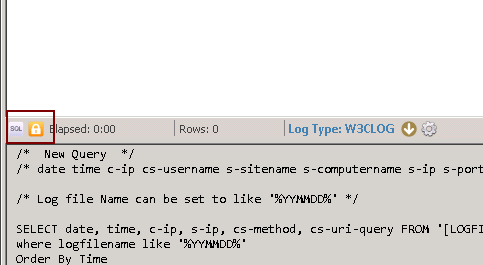
You will need to edit the query (pressing the lock icon):
[Note: To minimize the sql query press the sql button]
this part of it: [where logfilename like '%160610%'] to reflect the date you are looking for. It is similar syntax to SQL
[Note: To execute the query press the f5 button]
The results produced should be able to determine the reason the emails have failed. You may have to do some googling about the SMTP status code. A good result is 250 and a bad one is usually is 500.xxx