![CDPLogo2023_250x165.png]](https://kb.securecdp.com/hs-fs/hubfs/CDPLogo2023_250x165.png?height=40&name=CDPLogo2023_250x165.png)
Overview
CDPScanPort is intended for use by credit unions that are utilizing 3rd party scanning vendors to
scan their existing paper documents. Through CDPScanPort, these scanned documents in pdf
format, with their indexing information are stored in CDPManage and eventually pushed to off-site
storage by CDPMoveData.
CDPScanPort can also be used by the credit union themselves, as long as the requirements
written below are followed. CDPScanPort can also be used even if the credit union is not using
off-site storage.
Requirements
- CDPScanPort is supported on Windows Vista (32- and 64-bit systems) and Windows XP.
- The PDF file needs to have the following format as its file name: The indexing information is included in the file name. Group_Type_MemberNo_yyyymmdd_FirstName_LastName_SSN.pdf
Required:
- Group (should be exactly the same as it exists in CDPManage, case-sensitive)
- Type (should be exactly the same as it exists in CDPManage, case-sensitive)
- Member Number (numeric, 10 digits)
- yyyymmdd (does not have to be the current date)
Not Required:
- First Name
- Last Name
- SSN (numeric, 9 digits, no dashes)
- If a field is going to be left blank, then the underscore (_) delimiter should still be there.
- For example, if you are not going to enter the first name, last name and SSN, the pdf file name will be: “Member Services_Signature Card_0000128497_20060804___.pdf” (Note that there are 3 underscores in the end of the filename.)
- For example, if you are not going to enter the SSN, the pdf file name will be:
“Member Services_Signature Card_0000128497_20060804_Dylan_Carter_.pdf”
(Note that there is 1 underscore in the end of the filename.)
- Requires a CDP license.
Setup
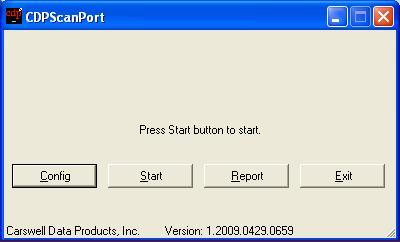
CDPScanPort will be run as a Scheduled Task. However, for initial setup, manually run CDPScanPort and click on the Configbutton.
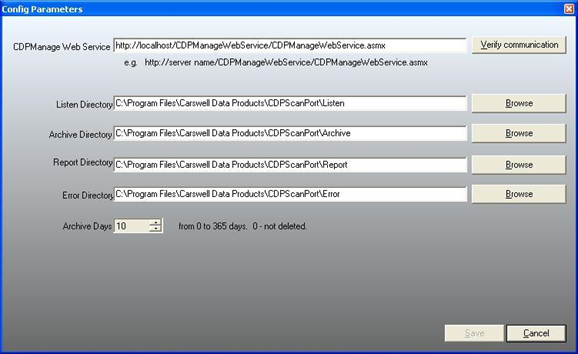
CDPManage Web Service: URL for the CDPManage web service on the CDP server. (One can
also get this information from Tools > Setup in CDPManage.)
Listen Directory: The “Landing Zone”, where CDPScanPort will get the pdf files. May be
network drive or local; UNC paths are also supported.
Archive Directory: Folder where files are placed after successful processing. Files will remain
for a customizable period of time (see also Archive Days).
Report Directory: Folder where reports are placed, whether successfully processed or not. Files
will remain for a customizable period of time (see also Archive Days).
Error Directory: Folder where files that were not successfully processed are placed, due to an
error. These files are not affected by Archive processing and will remain in the folder indefinitely.
Archive Days: Period of time to retain reports and processed files. Files with Creation Date older
than ‘n’ days will be deleted the next time CDPScanPort is scheduled to run.
Running CDPScanPort
CDPScanPort should be setup as a scheduled task, to be run and completed before the
scheduled MoveData task.
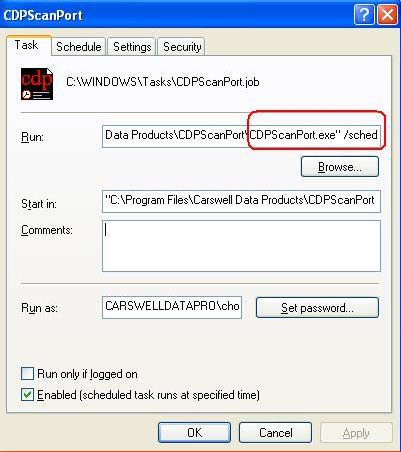
When creating the scheduled task, browse for the location of CDPScanPort.exe and add the
/sched option, as shown below
Reporting
Prior to being viewed, reports are created as a ScanPortmmddyyyy.txt file, under the Report
Directory. To look at a report the first time, start CDPScanPort and click on the Report button, then choose
the .txt file. The .txt file would then be automatically converted to an html file and displayed as
follows:
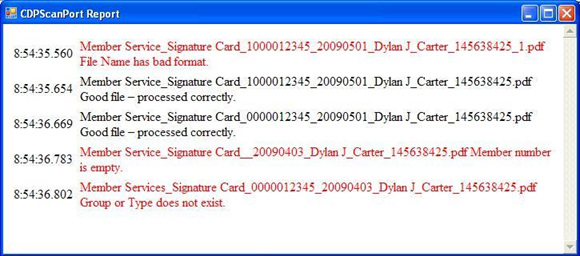
Errors are displayed in red. Look at the description of the error, and make the necessary
corrections. Most of the time, the error will be in the pdf filename. Verify that the filename follows
the requirements listed on page 1.
After the corrections are made, place the corrected pdf files in the Listen Directory.
CDPScanPort will process these files the next time it is scheduled to run.
NOTE: If the pdf file-naming convention is not followed, then this will result in errors. Correction
to the pdf file name needs to be done by the credit union (or the scanning vendor), not by
Complete Data Products (CDP). If CDP has to make the corrections, then CDP will charge
the credit union $125.00 per hour, with a 1 hour minimum.
- CDPScanPort.pdf (400 KB)