![CDPLogo2023_250x165.png]](https://kb.securecdp.com/hs-fs/hubfs/CDPLogo2023_250x165.png?height=40&name=CDPLogo2023_250x165.png)
If there isn't a shortcut you can always call the movedata configuration up by
"[Path to CDPMoveData]\cdpmovedata.exe" /config
password will either be carswell or complete
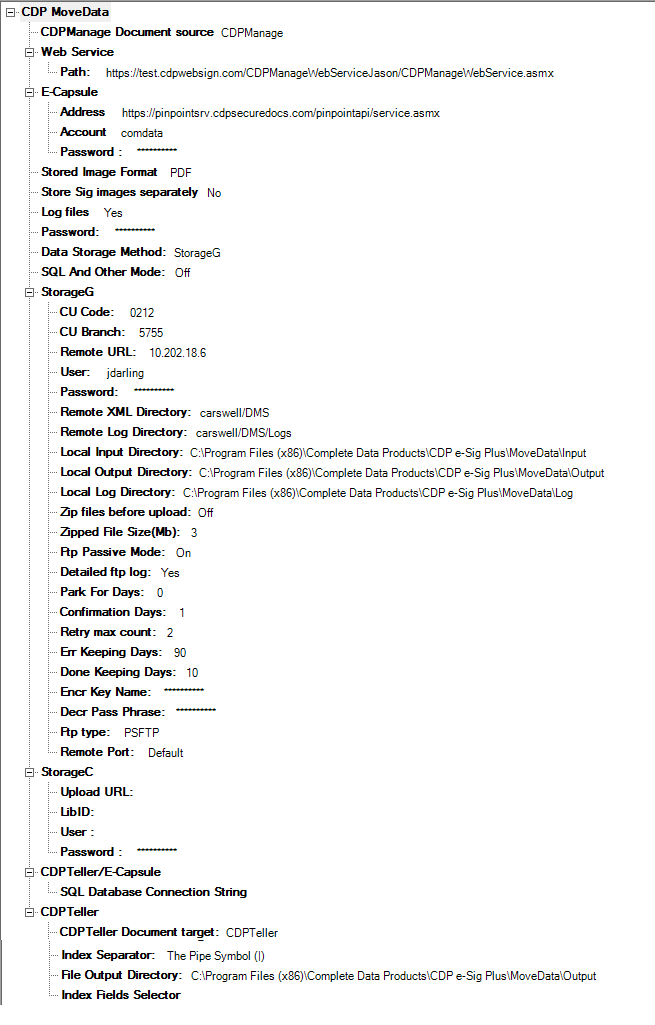
CDP MoveData
CDPManage Document Source: CDPManage or E-Capsule, will always without exception be CDPManage.
Web Service: URL to the CDPManage Webservice
E-Capsule: This is for extracting documents from Pinpoint, but will never be used.
Address:
Account:
Password:
Stored Image Format: Will always be PDF
Store Sig Images Separately: Should Always be set to No
Log Files: Should always be on Yes
Password: Changes the password to get into the config
Data Storage Method: Storage G or Storage S
Storage G: Fiserv Galaxy SFTP
Storage S: Symitar Cruise (Fiserv Galaxy IDS)
SQL And Other Mode: This setting will never be used keep to OFF
Storage G
CU Code: Fiserv Galaxy's CU Code
CU Branch: If Multiple MD running this helps differentiate files. Usually 0001
Remote URL: 10.202.18.6 [If storage G is selected]/198.246.218.142 [If Storage S is selected]
User: User Name Fiserv Galaxy provides to CDP
Password: Fiserv Galaxy provides this password to CDP.
Remote XML Directory: Should always be set to DMS
Remote Log Directory: Should always be set to DMS/Logs
Local Input Directory: [Path to CDPMoveData]\Movedata\Input
Local Output Directory: [Path to CDPMoveData]\Movedata\Output
Local Log Directory: [Path to CDPMoveData]\Movedata\Log
ZIP files before upload: Typically set to off. Can be set to on in cases where the file uploads fail because of file size and not enough bandwidth. Currently there isn't a single client that we are aware of that uses this with storage G.
Zipped File Size (MB): 3 (by default) sets the zip archive file size, once 3 MB is hit it creates another zip file.
FTP Passive: Should always be set to on.
Detailed FTP Log: Should always be set to yes.
Park for Days: Documents get deleted when system date of the server is <= Date Confirmed + Park for Days (x). Meaning, if it’s been confirmed today, then after x days from today, document will be deleted.
Confirmation Days: Number of days after being sent before it reports sent not confirmed files
Retry Max Count: how many times it tries to extract or upload a file after encountering an error.
Err Keeping Days: days to keep errored files in the input folder around
Done Keeping Days: days to keep normal files around in the input folder.
Encr Key Name: For storage S only. This should always be Operations Department
Decr Pass Phrase: should be the passphrase generated when the steps are taken in this article
https://cdp.zendesk.com/knowledge/articles/223614027/en-us?brand_id=513537
typically it would be the ID that fiserv provides to us for example cu9009, plus @carswelldata.com
Final result would be cu9009@carswelldata.com
FTP Type: Should always be set to PSFTP
Remote Port: PSFTP Default or port 22 (same thing)/ftp(not used) Default or port (21)
Storage C: None of these Settings will ever be used
CDPTeller/Ecapsule
SQL Database Connection String: database connection string for teller database
CDPTeller
CDPTeller Document Target: CDPTeller extracts cswl files. PDF File Typically it'll be CDPTeller unless another storage provider needs to pick up a file from a directory (this is specified in the file output directory), but when this is selected it will create a PDF file and an index file (indexing information for the transaction). One file is created per transaction.
Index Separator: can be a [-], [|],[,],or a[;]. Basically this helps decide how the indices in the index file are delimited.
File Output Directory: Used when PDF file is selected. Place where PDF files are stored.
Index Fields Selector: Select which database fields are put into the index file when the PDF file option is selected. Document Date, Member Name, Member Number. Seq Number, and Teller Number are the options that can be selected.
auto switch settings
/auto
/l cdpmanage
/t teller
/m memberid
/i memberid
/f upload
/c confirm
/d delete confirmed files
/n check for sent not confirmed files