![CDPLogo2023_250x165.png]](https://kb.securecdp.com/hs-fs/hubfs/CDPLogo2023_250x165.png?height=40&name=CDPLogo2023_250x165.png)
To add a new group or type in CDPManage do the following:
Open CDPManage and select Tools>login>password is carswell(unless changed)>tools again>Group/Type Index Fields E&M
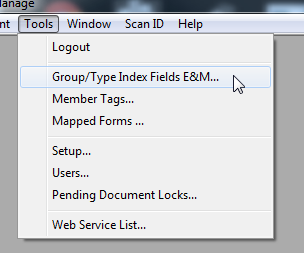
********IMPORTANT********
Do NOT touch any of the categories and fields on the right side of the this option, this can permanently delete fields from existing files in the database
Index Fields and Field sections should never be touched
Adding a new group
1) To add a group, highlight all documents at the top and select the add button
2) Scroll down and you sill see a 'New Group' section that is added
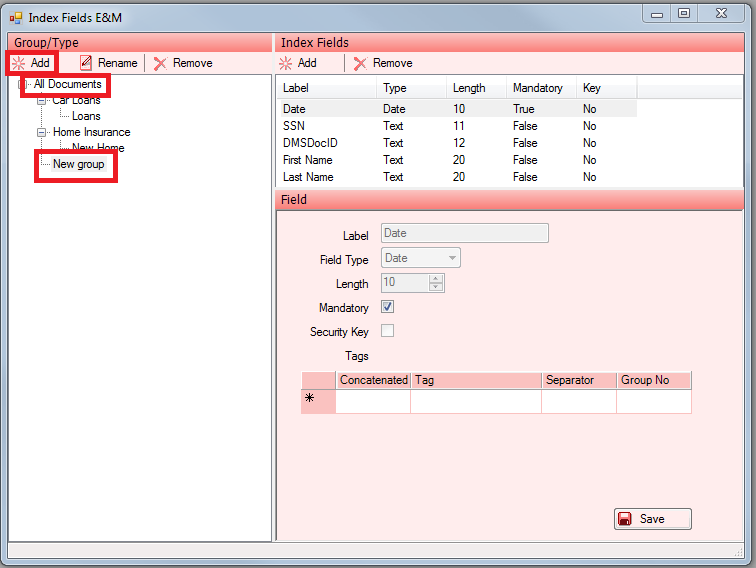
3) Right click on the 'New Group' and select rename
4) Type what you want to rename it to and press enter
5) Your new group has now been added
Adding a new type
1) Click on the already existing group you have in your system and select add
2) This will add a new type in that existing group call 'New Type'
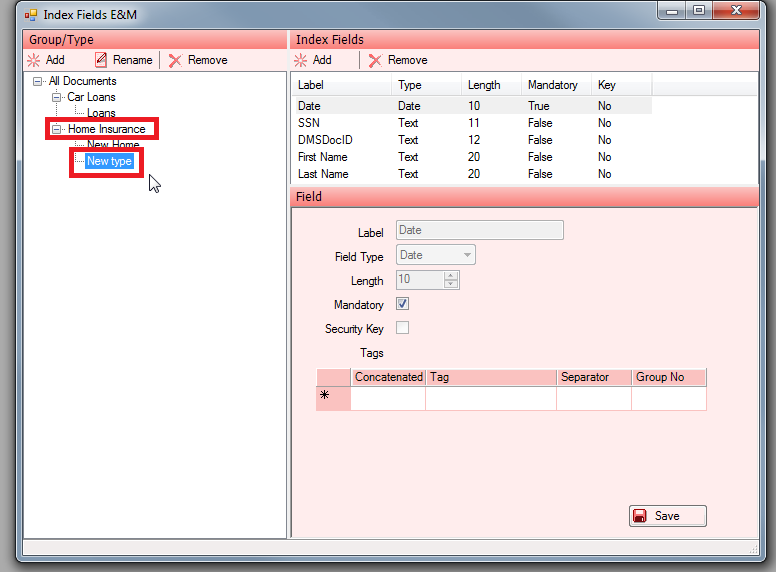
3) Right click on the 'New type' and select rename
4) Type what you want to rename it to and press enter
5) Your new type has now been added
*note: if you are a Galaxy client, you will need to saving something in a new type in order for it to show up in DMS initially*